Christmas looks you can go live in
Every look below is in the studio gallery. Face swap changes who you are, Restyle changes the whole picture, and Try-on changes only your clothes. Click one to open the studio.






Christmas stream ideas with a face swap
Santa reads the wish list
Switch to Santa and read out what chat wants for Christmas. Your own laugh and timing come through, which is what makes it funny.
Giveaway in costume
Run your holiday giveaway as Santa and switch back to yourself to announce the winner, so the moment stands out in the clip.
Chat picks the next look
Put Santa, the elf, the Christmas sweater and claymation up for a vote, then switch live to the winner without going offline.
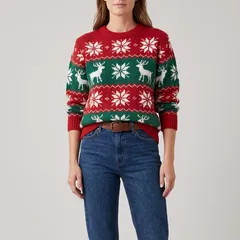
Holiday sweater for the whole stream
Keep your own face and use Try-on so you wear a Christmas sweater on camera all stream, no shopping trip needed.
How to become Santa on your webcam
- 1
Pick a Christmas look
Open the studio, choose Face swap and pick Santa or the elf, or choose Try-on for the Christmas sweater.
- 2
Turn on your webcam
Allow the camera in Chrome or Edge. Face the light and keep your whole face in the frame.
- 3
Go live
Press Start, then add the browser window to OBS as a Window Capture and stream as usual.
New to OBS? The OBS face swap guide walks through the capture, cropping and sound sync.
What a Christmas stream costs
New accounts get 60 free seconds to try every look. After that, 1 credit is 1 second, counted only while the swapped video is on screen. A 20 minute Santa segment uses 1200 credits. Four of those in December fit the Studio plan (3.5 hours a month). See all plans.
Keep it festive and fair
Go live as Santa, an elf or a made-up character, or as yourself with a new sweater. Do not pose as a real streamer, a celebrity or anyone in your chat, and keep it free of sexual content. If someone asks, tell them it is a filter. We check every uploaded portrait before a session starts.